

Hypic - Photo Editor & AI Art
Bytedance Pte. Ltd.
I opened Hypic when I wanted to turn an ordinary phone photo into something ready to share without spending time in a desktop editor. That starting point matters because this is not an app I would choose for detailed professional retouching or a carefully managed photography archive. It is a photography app from Bytedance Pte. Ltd. aimed at quick visual changes, with filters, AI effects, and touch-up tools gathered in a more approachable mobile workflow.
My first impression was that it tries to shorten the distance between “this picture is fine” and “this picture feels finished.” That makes it useful for portraits, casual travel shots, social posts, and small creative projects. The free download is rated for Everyone, and it runs on Android devices using version 6.0 or later. The current version is 8.2.0, so compatibility is fairly broad for people using older phones.
The app has built a sizeable audience, with over 50 million installs and an average rating of 4.0 from around 226 thousand ratings. I see that as a sign of broad appeal rather than proof that every tool will suit every photographer. Hypic is easy to approach, but its most attractive effects can also encourage quick, excessive editing if you do not keep an eye on the original image.
From an ordinary photo to a finished share
Starting with the right source image
The workflow begins with a simple decision: choose a photo that already has a useful subject, clear lighting, or an interesting shape. Hypic can make an image more polished, but it cannot reliably rescue every blurred, badly exposed, or poorly composed shot. I get better results when I start with a portrait where the face is visible, a product photo with some separation from the background, or a landscape with a readable horizon.
For a realistic everyday example, imagine taking a quick café portrait before meeting friends. The photo may have decent framing but flat color, distracting background details, and skin that looks slightly dull under indoor lighting. This is exactly the kind of input where the app makes sense. I would not begin by applying the strongest effect. I would first decide what the picture is supposed to communicate: a natural memory, a fashionable post, or a deliberately stylized image.
Latest News

Uber Eats Under Pressure: What Happens When Delivery Goes Wrong

How QR & Barcode Scanner Adapts to Android and iOS Innovations

Why Waze Navigation & Live Traffic Is Your Essential Travel Companion

CapCut Mastery: Unleash Hidden Features for Pro-Level Editing

How OS Updates Enhance Roblox Adventures

Teacher Simulator: Exam Time Turns Quick Classroom Judgments into a Repetitive Loop
That small decision prevents one of the common problems with AI-assisted editors: choosing a dramatic look before deciding whether the image actually needs one. Hypic gives you room to experiment, but the best result usually comes from treating the effect as a finishing choice rather than the entire creative plan.
Building the edit in layers
I normally start with a restrained filter or a basic visual adjustment, then inspect the face, clothing, and background separately. A filter that looks attractive on a full-screen preview may make skin too orange, deepen shadows in hair, or remove detail from a white shirt. Checking the image at a closer view before saving is worthwhile, especially when the photo will be used as a profile image or sent to someone who knows the original scene.
The magic-touch style tools are most useful when they solve a small distraction. A subtle cleanup around the background or a gentle improvement to the subject can make a photo feel more intentional. I prefer making one change, looking at the whole image, and then deciding whether another change is necessary. Stacking several automatic effects often produces a result that looks processed rather than personal.
Gallery
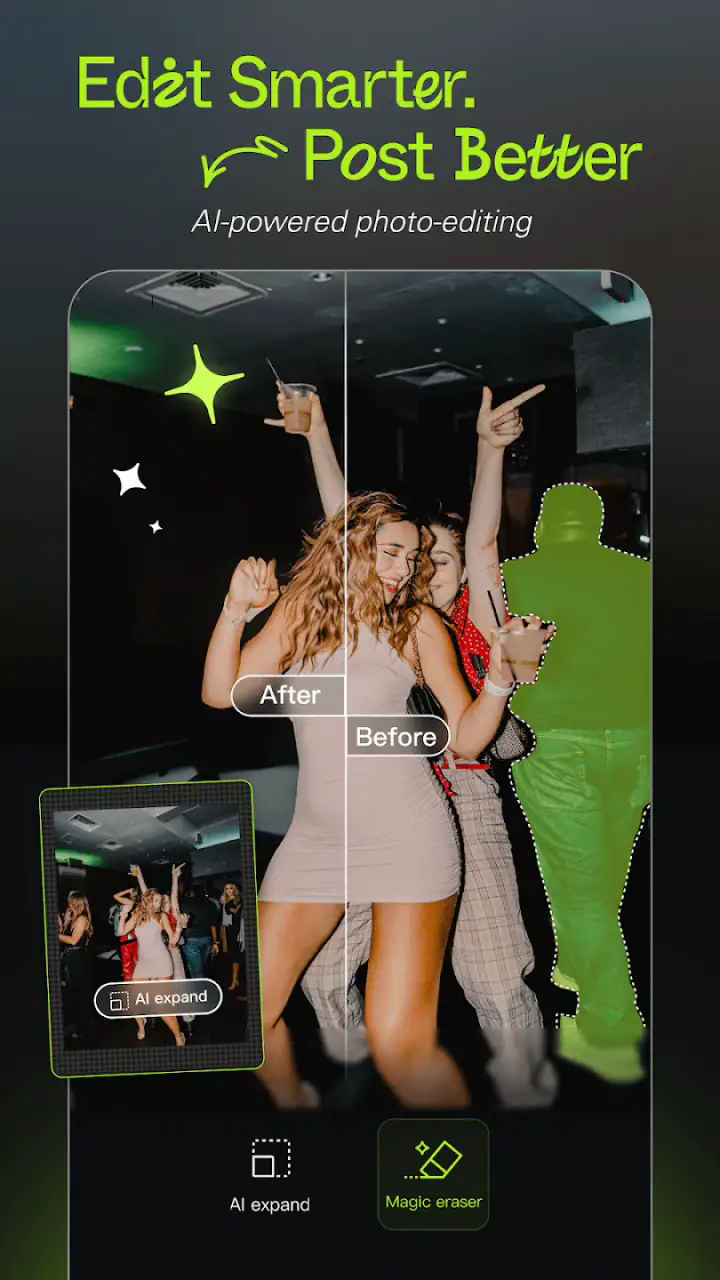
AI effects are where Hypic becomes more playful. They can move a normal photo toward an illustrated, imaginative, or trend-oriented appearance. I see these tools as a separate branch of the workflow, not merely a stronger version of a normal filter. If I want a believable portrait, I keep the AI treatment light or skip it. If I am making a visual for a story post, a mood board, or a playful message, the more obvious transformation can be the point.
Using touch-up tools without losing the person
Portrait editing needs a particularly careful hand. A small correction can improve the image, while too much smoothing can erase expression and texture. My practical rule is to compare the edited face with the unedited version repeatedly. If the first thing I notice is the retouching rather than the person, I have gone too far.
This is also where a quick editor differs from a full desktop program. Hypic encourages direct, visual choices instead of asking me to understand a long list of technical controls. That is convenient when I am editing on a phone, but it gives me less reason to expect surgical control over every individual feature. For a passport-style image, a client portrait, or work where facial accuracy matters, I would use a more precise editor and keep the changes conservative.
A useful habit is to edit for the final viewing size. A portrait intended for a small social thumbnail can tolerate a slightly different balance than one meant to be viewed full-screen. I do not judge only from the zoomed-in editing view. I also shrink the image mentally, because an effect that looks subtle up close may become the dominant feature once the picture is displayed small.
Preparing the image for its next destination
The handoff after editing is just as important as the edit itself. I may be sending the image through a messaging app, posting it to a social feed, or placing it into a small personal collage. Each destination rewards a different level of detail. A heavily stylized image can work well as a casual post but feel inappropriate when used for a professional profile or a family announcement.
I also keep the original photo separate from the edited version. That simple habit protects me from making a temporary trend permanent. If I later decide that the colors are too strong or the AI effect has aged badly, I can return to the starting image instead of trying to undo a chain of decisions. This is especially helpful when I am testing several visual directions for the same picture.
When an image is going to another app, I check the saved result before sharing it. I look for unexpected cropping, small facial changes, text or decorative elements that no longer fit the frame, and a general loss of detail. The preview inside an editor is not always the same experience as viewing the final file in a gallery or messaging conversation, so this last check is a practical part of the Hypic workflow.
Where the app feels strongest
Hypic is at its best when the desired outcome is immediate and visual: a more attractive portrait, a moodier vacation photo, a playful AI variation, or a polished image for casual sharing. I can move from a normal camera shot to something with a clear style without learning the deeper language of curves, masks, layers, and color profiles.
That makes it a good fit for people who find traditional editing apps intimidating. It is also useful for someone who already understands photography but wants a fast mobile pass before sharing. I would happily use it for a group photo that needs a little energy, a food image that looks flat, or a quick creative experiment where speed matters more than perfect control.
The free price lowers the barrier to trying it, although in-app purchases range from $2.99 to $159.99 per item. I would pay attention to which tools are available without payment before planning a regular editing routine around them. A free starting point is convenient, but a workflow that depends on a particular paid effect may feel less flexible over time.
Where it differs from usual photo editors
Compared with a traditional mobile editor, Hypic puts more emphasis on ready-made looks, AI-driven transformations, and fast visual decisions. A conventional editor is often better when I want to correct exposure carefully, preserve a natural face, or make the same precise adjustment across many images. Hypic is more appealing when I want to explore a look and judge it immediately.
Compared with a basic phone gallery editor, it offers a more creative direction. The built-in editor on a phone is usually enough for cropping, rotating, and making a small brightness correction. Hypic becomes worthwhile when those basic changes are not enough and I want the image to have a recognizable mood or artistic treatment.
Compared with a dedicated AI art tool, Hypic feels closer to the original photograph because the starting point is still an image I have chosen and shaped. I would not treat it as a replacement for a serious illustration workflow. Its value is in the bridge between a real photo and a stylized result, especially when I want to keep the process quick and understandable.
The friction points I noticed
The same convenience that makes Hypic approachable can limit it. Automatic effects can make decisions on my behalf, and those decisions are not always what I would choose if I were editing carefully. Faces may look too smooth, colors may become louder than the scene, and an interesting background may turn into visual noise once an effect is applied.
There is also a creative trade-off in relying on popular visual styles. A ready-made effect can help an image look finished in seconds, but it can also make several unrelated photos feel similar. If personal style matters to you, I would use the presets as starting points and then reduce their intensity where possible rather than accepting the first preview as the final answer.
People who need repeatable, technical work may find the app less satisfying than a more manual alternative. Editing a single portrait is one task; maintaining a consistent look across a large set of product images is another. Hypic is designed around quick individual outcomes, so I would choose a tool with stronger batch and precision controls for catalog work, client delivery, or color-sensitive projects.
The purchase structure is another point to consider. The app is free to install, but some users may encounter paid options while exploring its broader creative range. I would try the no-cost workflow first and decide whether the extra effects genuinely improve my results. Paying only makes sense if I repeatedly use those particular tools rather than simply wanting access to everything visible in the interface.
Who should use it and who should skip it
I recommend Hypic to casual photographers, social media users, students, and anyone who wants a quick transformation without studying a complex editor. It is especially suitable when the final image will be viewed on a phone and the goal is a clear visual mood rather than laboratory-level accuracy.
I would be more cautious about recommending it to professional photographers who need dependable color management, detailed masking, or a repeatable production process. I would also suggest another option for people who dislike AI-assisted changes or want every retouching decision to remain completely manual. The app can be fun and effective, but it is not automatically the best choice simply because it can produce a striking preview quickly.
For a new user, my advice is to make two versions of the same photo: one with a light touch and one with a stronger effect. Compare them after a short break. The stronger version often feels exciting at first, while the restrained version may remain more believable and useful when you look again later. This small comparison is one of the easiest ways to avoid over-editing.
My final take after following the whole workflow
Hypic is most convincing as a fast bridge between an everyday camera photo and a shareable visual idea. It handles the moment when I have a decent image but not the time, patience, or technical interest to build an edit from scratch. The filters, AI effects, and touch-up approach make experimentation accessible, and the broad device support helps more people try it.
I would still keep a second editor available for jobs that demand precision. Hypic works best when I judge the image by its purpose, compare the result with the original, and resist the temptation to use every effect at once. Its strongest quality is speed with personality; its main weakness is that speed can hide small flaws until the edit has already become too intense.
With over 1.3 thousand written reviews alongside its large rating base, the app clearly attracts active interest, though the 4.0 average suggests a mixed experience rather than universal approval. That feels fair to me. Hypic is a capable free photography app for quick creative edits, but it rewards users who make deliberate choices instead of handing the entire image over to automation.
In the end, I would install it for portraits, casual posts, and short creative experiments. I would skip it as my only editor if I were managing professional image sets, demanding natural retouching, or needing exact control from the first adjustment to the final export. For the everyday scenario of turning a flat phone snapshot into something with a little more character, though, it is an enjoyable and practical tool from Bytedance Pte. Ltd.
FAQs for Hypic - Photo Editor & AI Art
What features does Hypic - Photo Editor & AI Art offer?
Hypic offers a comprehensive suite of photo editing tools, including filters, effects, and AI-driven enhancements. Users can enjoy features like background removal, artistic effects, and advanced retouching options, making it ideal for both casual edits and professional-quality results.
Is Hypic - Photo Editor & AI Art free to use?
Hypic is available as a free download, offering a range of basic features at no cost. However, it also includes premium features and tools available through in-app purchases or a subscription model, which unlocks additional content and advanced functionalities.
Does Hypic support all image formats?
Hypic supports a wide array of popular image formats, including JPEG, PNG, and TIFF. This ensures compatibility with most photos taken on smartphones and cameras, allowing users to effortlessly edit and enhance their images without format limitations.
How user-friendly is Hypic for beginners?
Hypic is designed with an intuitive interface that caters to both beginners and experienced users. Its simple navigation and easy-to-use tools make it accessible for users with no prior editing experience, while still offering advanced features for more seasoned editors.
Can Hypic - Photo Editor & AI Art be used offline?
Yes, Hypic can be used offline for basic editing functions, allowing users to work on their photos without an internet connection. However, some AI-driven features and updates may require online access to function optimally and to access the latest enhancements.
Pros
- User-friendly interface with intuitive controls
- Wide variety of filters and effects available
- AI art feature generates creative outputs
- Fast processing without noticeable lag
- No intrusive ads affecting user experience
Cons
- Limited free features without subscription
- Occasional crashes on older devices
- AI art results can be inconsistent
- High-quality exports require premium
- Some filters may seem repetitive


